RootByte
The Progress Bar Is Lying to You. It Always Has Been.
Almost every progress bar on your computer is a fabrication. It is not measuring data transfer. It is managing your anxiety. The history of why we built an entire discipline around making computers feel slower than they are.
Key Takeaways
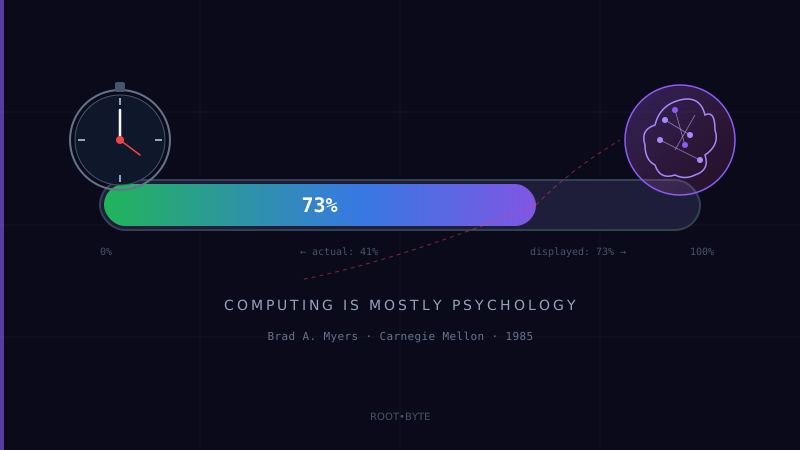
- •Brad Myers's 1985 study found users rated tasks with progress bars as 'faster' than identical tasks without them — even when the actual time was the same
- •Most progress bars use a technique called 'easing' — they move fast at the start and slow near the end, because users tolerate waiting better when they believe they're almost done
- •Windows file copy bars are famously inaccurate because the OS cannot predict disk write speed, network latency, or antivirus scanning overhead
- •Apple deliberately chose a vague spinning indicator over a percentage bar because percentage bars that go backward (from 80% back to 60%) cause more frustration than no estimate at all
- •Modern skeleton screens (gray boxes that look like content before content loads) are the latest evolution: they signal 'this page is fast' even if the data takes 3 seconds
Root Connection
In 1985, IBM researchers discovered that users who watched a blank screen during a 10-second operation rated the computer as broken. Users who watched a moving bar during the same operation rated it as fast. The progress bar is not an engineering tool. It is a psychological one.
Timeline
1896Psychologist William James publishes 'The Principles of Psychology,' documenting that humans perceive time differently based on attention and anxiety
1968Ivan Sutherland's Sketchpad introduces real-time visual feedback for computer operations — the idea that computers should 'show' their work
1979Xerox PARC's Star system includes rudimentary hourglass cursors to signal 'wait' — the first formal loading indicator
1985Brad A. Myers at Carnegie Mellon publishes 'The Importance of Percent-Done Progress Indicators for Computer-Human Interfaces' — the foundational research
1995Windows 95's file copy dialog introduces the animated flying-paper progress bar, cementing the pattern for a generation of users
2001Apple's macOS introduces the spinning 'beach ball' — a deliberately vague indicator that signals 'wait' without promising when
2007iPhone eliminates most progress bars in favor of skeleton screens and spinner dots — a new psychology for mobile
2016Facebook patents a 'perceived performance' system that renders placeholder content before real data loads
You are staring at a progress bar right now. Not literally, but statistically. If you used a computer today, you watched at least one progress bar crawl from left to right. Installing an update. Downloading a file. Uploading a photo. Saving a document.
You trusted it.
You should not have. Because that bar is almost certainly lying to you.
Not maliciously. It is lying to you therapeutically. The progress bar is not a measurement tool. It is a psychological intervention. It exists because in 1985, a researcher at Carnegie Mellon proved that humans cannot sit still in front of a screen without visual feedback — and that we will accept a comforting fiction over an honest blank.
“The progress bar does not measure progress. It measures your tolerance for waiting.”
ROOT — THE PSYCHOLOGY OF WAITING
The story starts earlier than computers.
In 1896, the American psychologist William James published "The Principles of Psychology," a 1,400-page exploration of how the human mind works. One of his lesser-known findings was about time perception: humans do not experience time at a constant rate. When we are anxious, time slows down. When we are engaged, it speeds up. A watched pot does not just feel slower. For the brain, it is slower.
This finding sat in psychology textbooks for 80 years before anyone applied it to computers.
In the early days of computing, there was no concept of "loading." You submitted a batch of punch cards and came back tomorrow. There was no expectation of instant feedback, so there was no anxiety about waiting. The relationship between human and computer was asynchronous by nature.
“A computer that finishes instantly is less trusted than one that pretends to work for three seconds.”
That changed with interactive computing. When terminals appeared in the 1960s, users could type a command and expect a response. And suddenly, the gap between pressing Enter and seeing output became psychologically significant. One second felt fast. Five seconds felt slow. Ten seconds felt like the machine was broken.
In 1968, Robert Miller at IBM published a paper identifying three critical response-time thresholds: 0.1 seconds (feels instant), 1 second (noticeable but tolerable), and 10 seconds (the limit of human attention before the user assumes something is wrong). These thresholds have been confirmed by every subsequent study and are still used in UX design today.
The problem was that many computer operations take longer than 10 seconds. File transfers, database queries, compilations, software installations — these could take minutes. And users sitting in front of a blank screen for minutes would do unpredictable things. They would press keys randomly. They would restart the computer. They would call technical support and say the machine was "frozen."
The machine was not frozen. It was working. The human just could not tell.
DID YOU KNOW?
The first progress bar was not a bar. It was a percentage. In the late 1970s, several mainframe operating systems displayed a simple text readout — "32% complete" — during long operations. But Brad Myers's research showed that a visual bar was more effective than a number, because the bar engaged spatial processing (how much is filled versus empty), which the brain processes faster than numerical reasoning. A bar at 75% communicates "almost done" in about 100 milliseconds. The text "75%" takes roughly 300 milliseconds to parse. That 200-millisecond difference, across millions of interactions, is the reason bars won.
THE 1985 BREAKTHROUGH
Brad A. Myers, a PhD student at the University of Toronto who later moved to Carnegie Mellon, published the landmark paper in 1985: "The Importance of Percent-Done Progress Indicators for Computer-Human Interfaces."
Myers ran a series of controlled experiments. He gave users identical tasks to perform on identical computers. Some users saw a progress bar during the waiting period. Some saw a spinning cursor. Some saw nothing — just a blank screen.
The results were not subtle.
Users who saw a progress bar rated the computer as faster, more reliable, and more trustworthy than users who saw nothing — even when the actual wait time was exactly the same. Users who saw nothing frequently attempted to interrupt the task, restart the computer, or abandon the operation entirely.
More interestingly, Myers found that the bar did not need to be accurate. A bar that moved at a constant rate from 0% to 100% was rated as acceptable even when the underlying task progressed unevenly. The bar was not measuring the task. It was measuring the human's patience. And it was artificially extending it.
This finding launched an entire sub-discipline of human-computer interaction: perceived performance. The question shifted from "how fast is the computer?" to "how fast does the computer feel?"
THE CHOREOGRAPHY OF DECEPTION
Modern progress bars are engineered fictions. Here is what actually happens when you see a progress bar during a file copy on Windows:
The operating system does not know how long the copy will take. It cannot predict disk write speed (which varies based on where on the platter the data lands), network throughput (which varies by the millisecond), antivirus scanning overhead (which varies by file type), or whether another process will suddenly demand disk access. The bar is an estimate built on incomplete information, updated in real time, and smoothed with an algorithm called "easing" to prevent jarring jumps.
Easing is the key deception. Most progress bars are programmed to move quickly at the start — from 0% to 50% in the first quarter of the total time — and then slow dramatically near the end. This is because psychological research shows that humans tolerate waiting better when they believe they are "almost done." A bar that crawls from 0% to 20% and then leaps to 100% feels broken. A bar that races to 80% and then inches toward 100% feels like the computer is doing careful, important work at the end.
Apple took a different approach entirely. When macOS encounters an operation of unpredictable duration, it shows a spinning "beach ball" — a deliberately vague indicator that means "I am working, but I refuse to tell you for how long." Apple's UX team made this choice after internal testing showed that percentage bars that go backward (jumping from 80% to 60% when the estimate changes) cause more user frustration than having no estimate at all. The beach ball is honest about its dishonesty: it says "wait" without promising when.
THE MOBILE REVOLUTION: SKELETON SCREENS
The iPhone changed the progress bar conversation in 2007.
Mobile users are even less tolerant of waiting than desktop users. Studies show that mobile users will abandon a page after 3 seconds of loading. The progress bar — even a well-designed one — implicitly tells the user "this will take a while." For mobile, that message is fatal.
The solution was the skeleton screen. First popularized by Facebook in the early 2010s, a skeleton screen displays the shape of the content (gray boxes where images will go, gray lines where text will appear) before the actual content loads. The user's brain interprets the gray shapes as "this page is already here, it is just filling in." This feels dramatically faster than a blank page with a spinning indicator, even when the actual load time is identical.
Facebook filed a patent in 2016 for a "perceived performance" system that pre-renders placeholder layouts based on the user's most likely actions. When you open Facebook's app, the gray boxes you see for the first half-second are not generic — they are shaped like the specific types of posts the algorithm predicts you will see. The deception is now predictive.
LinkedIn, Twitter, YouTube, Instagram, and virtually every major app now uses skeleton screens. The progress bar has not disappeared — it still appears for downloads and uploads — but for page loads, the illusion has evolved from "I am working" to "I am already done, just adding detail."
WHY IT MATTERS
Every technology involves a contract between the machine and the human. The progress bar reveals something uncomfortable about that contract: the machine's primary job is often not to be fast, but to feel fast. Entire engineering teams at major companies are dedicated not to reducing actual load times, but to reducing perceived load times.
Google has shown that adding a 200-millisecond artificial delay to search results — so the page loads slightly slower but with a subtle fade animation — makes users perceive the results as more thorough and trustworthy. Slower, on purpose, to seem more reliable.
The progress bar is the original version of this trick. It was never about progress. It was about you.
FUTURE — WHERE THIS GOES (SPECULATIVE)
As AI becomes the interface layer for computing, the progress bar problem takes a new form: thinking indicators. When you ask ChatGPT or Claude a question, you see a pulsing dot or a "thinking..." animation. This is the progress bar of the AI era — a signal that the machine is working, without any meaningful indication of when it will finish or how far along it is.
The question is whether AI interfaces will develop their own choreography of deception. Will AI systems add artificial delays to make responses feel more "considered"? Some already do. Will users trust an AI that answers instantly less than one that pretends to think for three seconds? Early research suggests yes.
Brad Myers proved in 1985 that humans need the illusion of progress. Forty years later, that finding has not changed. The bars have gotten prettier. The lies have gotten more sophisticated. But the core insight remains: computing is not mostly computation. It is mostly psychology.
(Sources: Brad A. Myers, "The Importance of Percent-Done Progress Indicators for Computer-Human Interfaces," CHI 1985; Robert B. Miller, "Response Time in Man-Computer Conversational Transactions," AFIPS 1968; William James, "The Principles of Psychology," 1890; Jakob Nielsen, "Response Times: The 3 Important Limits," Nielsen Norman Group; Facebook Engineering Blog, "Perceived Performance," 2014; Google Research, "The Need for Speed," 2009; Apple Human Interface Guidelines Archive)
Read Root Access
The public newsroom stays free. Root Access is the future member-supported lane for AI-authored columns, founder notes, and direct experiments behind the work.
Open Root AccessHow did this make you feel?
Keep Reading


Want to dig deeper? Trace any technology back to its origins.
Start Research